When Are We Both Free? A Tiny App for a Household Question
The Question We Kept Asking
Our household runs on calendars. Two work calendars, two personal calendars, and one shared household calendar for dinner reservations, concerts, plans with friends and appointments.
And yet the most common calendar question in our house isn't on any of them:
"When are we both free?"
For lunch. For dinner. For a quick coffee between meetings. The answer lives across five calendars, two of which belong to our employers. In practice, the answer lived in a text thread: "Are you free at 12?" "No, 12:30?" "I have a thing at 1."
So I built a small app that answers that one question. This post is about the problem more than the code: what we needed, what got in the way, and what we'd still change.
What We Needed
The requirements were short:
- One question, answered at a glance. When are we both free, today and this week?
- Phone first, plus a tablet on the wall. Something you can read while walking past the kitchen.
- Respect our employers. Work calendars stay private. The app only learns when we're busy, never what we're doing.
- Follow us when we travel. Times shown in whatever timezone the viewer is in.
- Never lie about being free. If the app isn't sure, it should say so.
- Cheap and boring to run. Ideally free, with nothing to babysit.
That "never lie" requirement ended up shaping more of the design than anything else.
The Constraints
Work calendars are locked down, and that's fine. Both of our employers let us share free/busy information with an outside account, and nothing more. So the app sees blocks of busy time with no titles, no attendees and no locations. That's a feature: if the app is ever compromised, there's nothing interesting to leak.
Google stays the source of truth. No database, no copies, no sync jobs. Every time someone opens the app, it asks Google fresh and forgets the answer.
Free hosting tier. The whole thing has to fit inside free plans and stay fast enough to feel instant.
Two people, one sign-in story. It's private to our household. No accounts to create, no passwords to remember.
What We Built
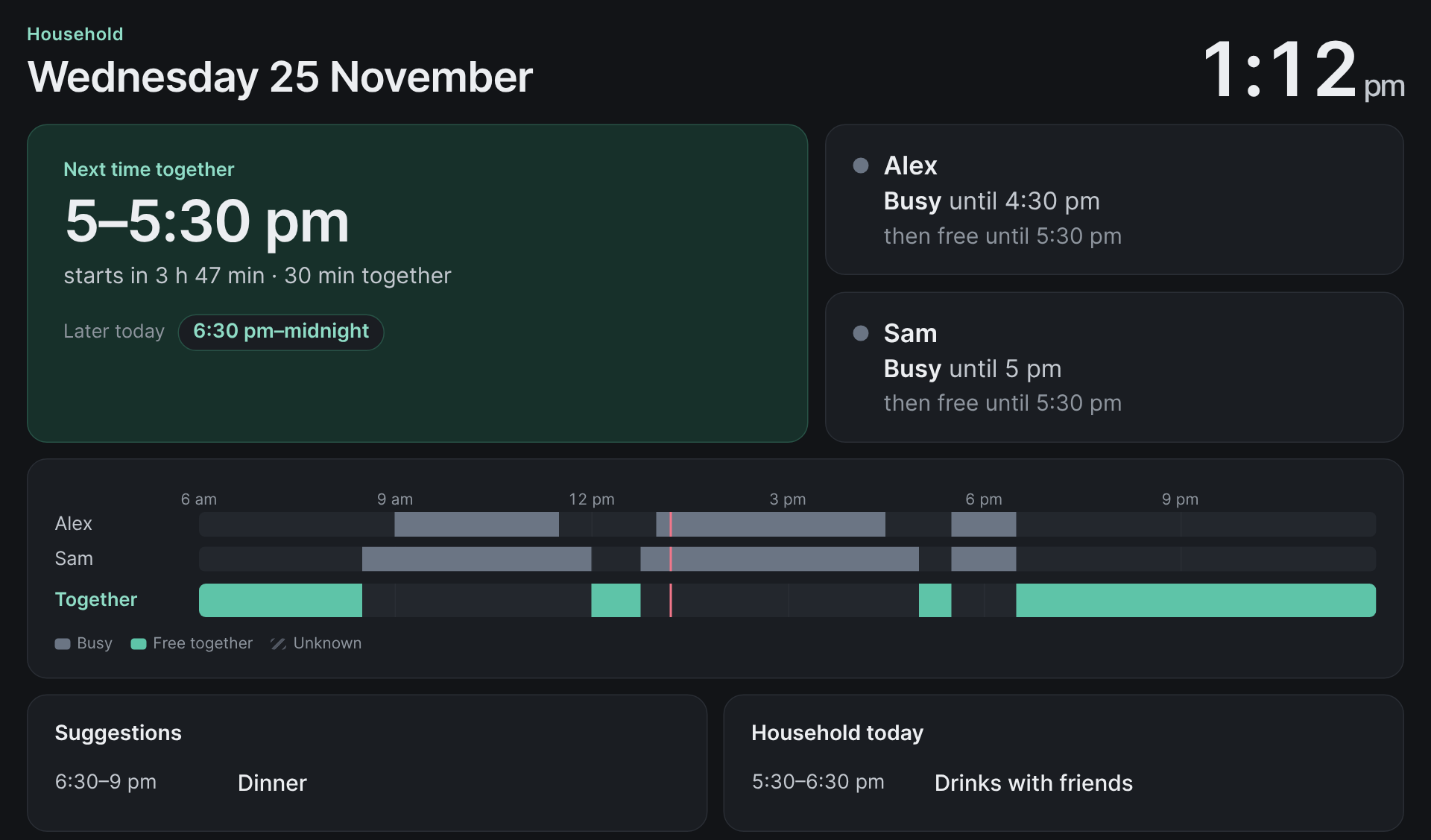
The app sits behind a login page that emails a one-time code. Behind that, it asks Google for each person's busy time and the household calendar's events, merges everything, and paints three rows: one for each of us, and Together.
Each moment is one of three things:
- Free. Every calendar agrees.
- Busy. Any calendar says so.
- Unknown. A calendar didn't answer, or isn't shared yet.
Unknown is never treated as free. If one calendar goes quiet, the app shows a gray hatched block instead of a cheerful "you're both free!" That one rule prevents the most embarrassing class of bug.
On top of that sit a few small things:
- Next time together, front and center.
- Lunch and dinner suggestions inside the windows where we're both free, each with a "Plan this" link that opens a pre-filled calendar event.
- A scrubber. Run your finger along the timeline to see exactly who's busy, from when to when.
- A wall display. Big clock, big type, nothing to tap. It dims at night and says plainly when its data is stale.
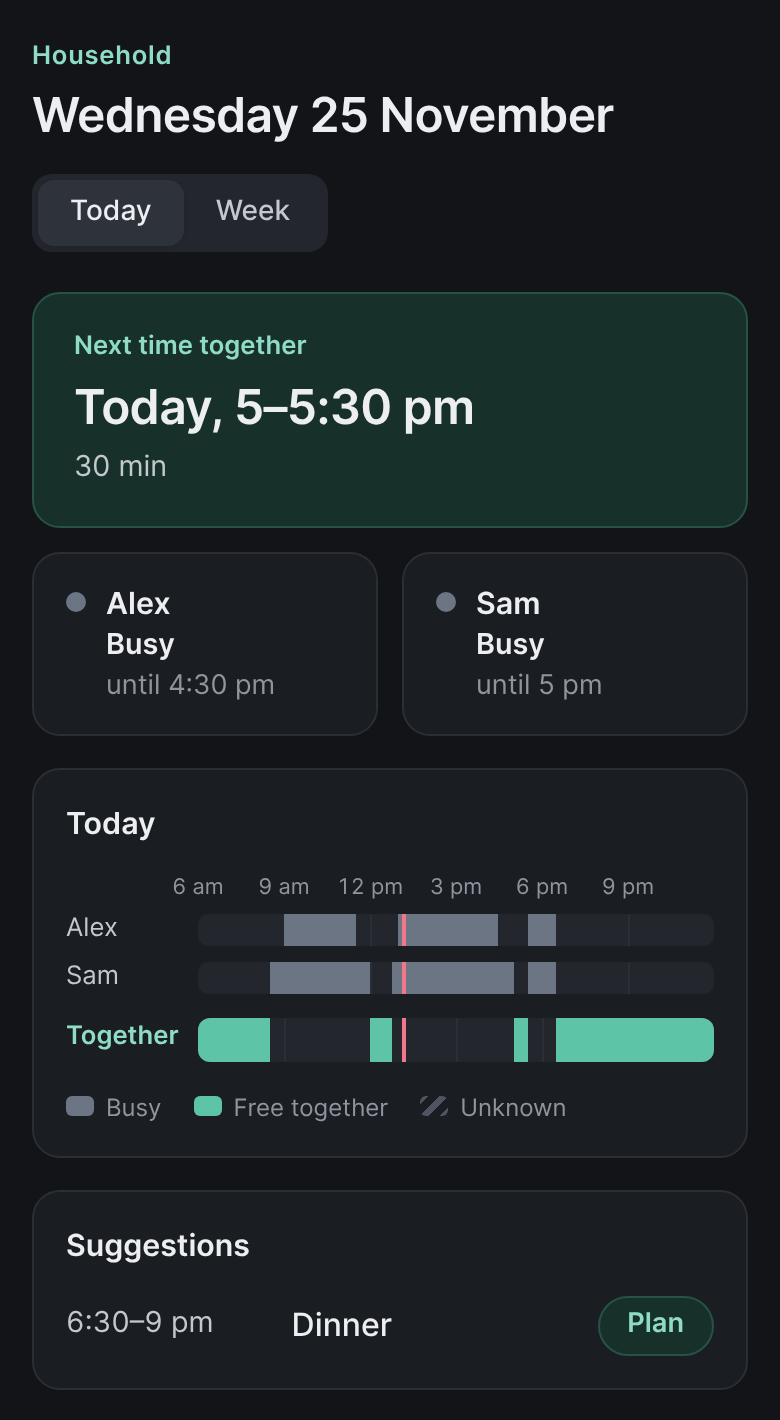
The design went through three rounds. The first was too muted, the second too loud. The third uses one accent color, and only for time together. Busy time is a soft gray, and everything else gets out of the way. It turns out "use color only where it answers the question" is a pretty good rule.
How It Fits Together
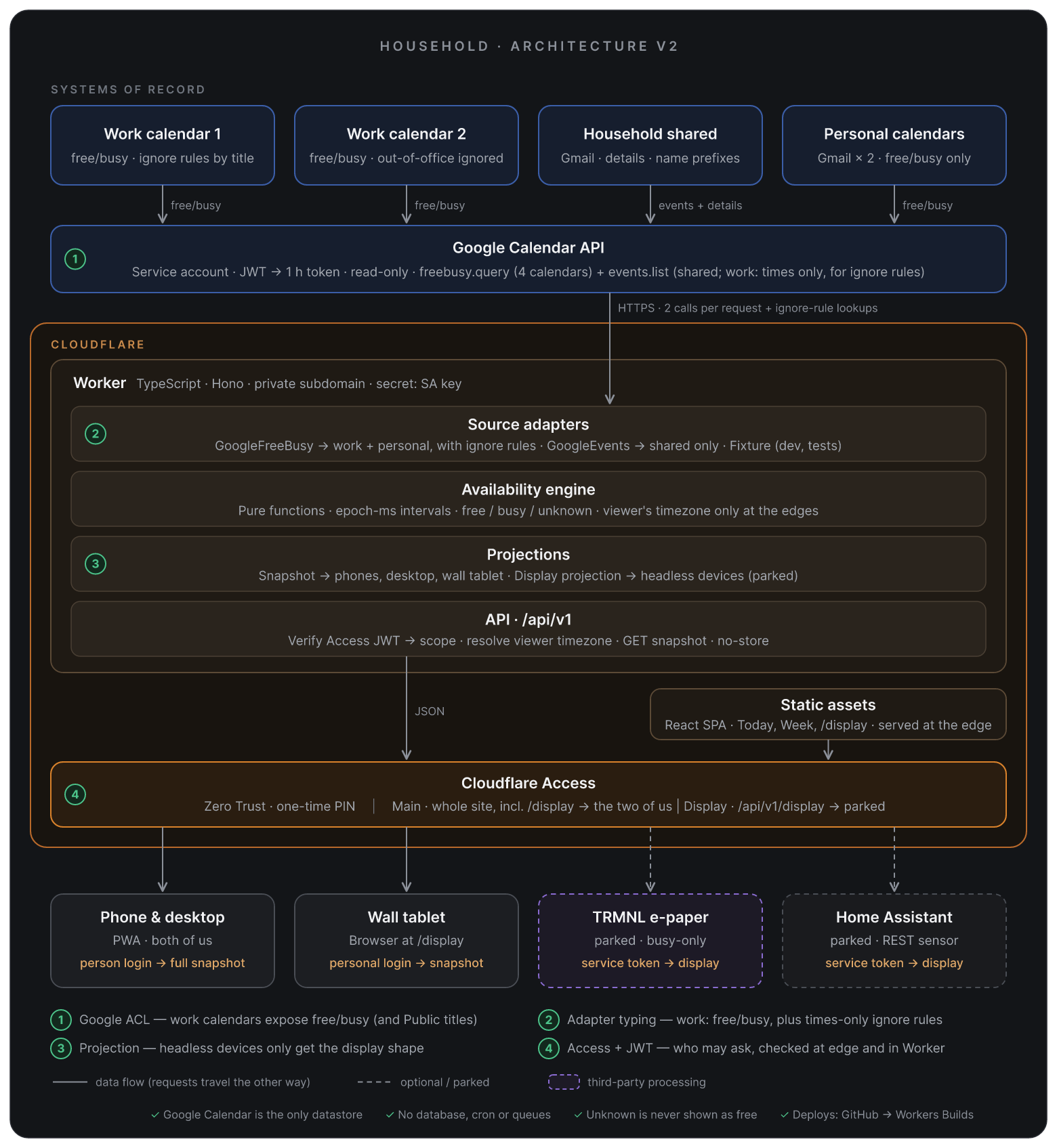
For the curious, here's the whole thing on one page. The short version:
- Google holds the calendars. We each shared our calendars with a single robot account: free/busy only for work and personal calendars, details only for the household one.
- A small app on Cloudflare's free tier asks Google on every visit, works out who's free when, and forgets the answer.
- Cloudflare Access is the front door. You sign in with a one-time code by email, and the app double-checks that sign-in itself.
- Phones, a laptop and a wall tablet all show the same answer in their own timezone.
Things That Surprised Us
My lunch counted as busy. My work calendar has a recurring lunch block so colleagues don't book over it. To the app, that looked like a meeting, and it hid the exact hour we'd want to have lunch together. The fix: a short list of events to ignore by name, like lunch and my start- and end-of-day blocks. The catch: if a real meeting overlaps my lunch, the app still shows me busy.
The other employer is stricter. Those same name-based rules didn't work on the second work calendar. That employer hides event titles from outside accounts, even for events marked public. The start- and end-of-day blocks there are "out of office" events, and Google won't tell outsiders an event's type either. It will, however, answer "which of these are ordinary events?" Everything that isn't ordinary gets ignored. It's a little clever, which makes me nervous, so it fails safe: if Google ever changes its behavior, that calendar looks busier, never freer.
Timezones are sneaky. One evening the app showed one of us a meeting that "didn't exist." It did exist, just two hours earlier: that calendar was set to a different timezone than the one its owner was actually in. The app was right; the calendar's own view was the misleading one. Separately, the timezone tests started failing because the timezone database had quietly changed the daylight-saving rules for our home region. Nobody told me about that one.
A 15-minute gap is not "time together." An early version cheerfully announced "Free together now, until 1:15!" because we both had a short gap between meetings. Now anything under 30 minutes doesn't count.
Limitations
- Free on a calendar isn't the same as free. Commutes, errands, a call that runs long and plain old energy levels don't show up as busy blocks.
- Calendars have to be honest. If something isn't on a calendar, the app can't know about it.
- One workaround leans on undocumented behavior. The out-of-office trick works today. It's built to fail toward "busy," but it could stop working without warning.
- Google only. A non-Google work calendar would need another adapter.
- The wall tablet signs in monthly. A small price for keeping everything behind a login.
Alternatives We Considered
Just share calendars with each other. This is what most couples do. Employer policies limit it to free/busy, and overlaying four calendars on a phone screen is a squint test, not an answer.
A family organizer app or smart wall calendar. These are lovely if you move your life into them. They can't see a locked-down work calendar, and we didn't want another place to keep events.
Scheduling tools. They're built for strangers booking a slot with you, not for two people trying to find dinner.
Mark lunch as free in my work calendar. That would work, but then colleagues would happily book meetings over it. The ignore list keeps work and home seeing different, correct answers.
An e-paper display or a smart-home sensor. Both are on the list, and both are parked. A tablet in a browser was the simplest wall display, and it needed no new hardware.
A database and background jobs. It would have made some features easier, notifications especially. But with no stored data there's nothing to back up, migrate or leak, so they stay out until there's a real need.
Where It Landed
It's a small, quiet app that answers one question well. Most days we glance at it, see "Next time together: 12:30–1:15," and skip the text thread entirely.
What's next, if anything: a nudge when a shared window is coming up, and a gentle hint when someone's calendar is in a different timezone than they are. Both are easy to build. The harder question is whether we want our calendar app to start talking to us.
For now, it just answers when asked. That feels about right.