Multi-Agent OpenClaw on a DGX Spark: Local AI That Actually Keeps Up
Why I Built This
When NVIDIA announced NemoClaw at GTC on March 16, I'd already been running a multi-agent OpenClaw setup on a DGX Spark for a couple of weeks. NemoClaw packages a lot of what I had to wire together manually: local inference, sandboxing, a privacy router for cloud fallback. It's a good thing that NVIDIA is standardizing this. But I built mine because I didn't want to wait, and because the specific thing I needed (two independent agents sharing one GPU box, with full observability) wasn't available off the shelf.
The motivation was straightforward. I wanted always-on AI agents for routine tasks1 without sending everything to a cloud API. Per-token costs compound quickly when agents loop through dozens of inference calls per task, and I'd rather spend that money once on hardware. The DGX Spark with 128GB of unified memory made local inference viable in a way it hadn't been before.
Why the DGX Spark
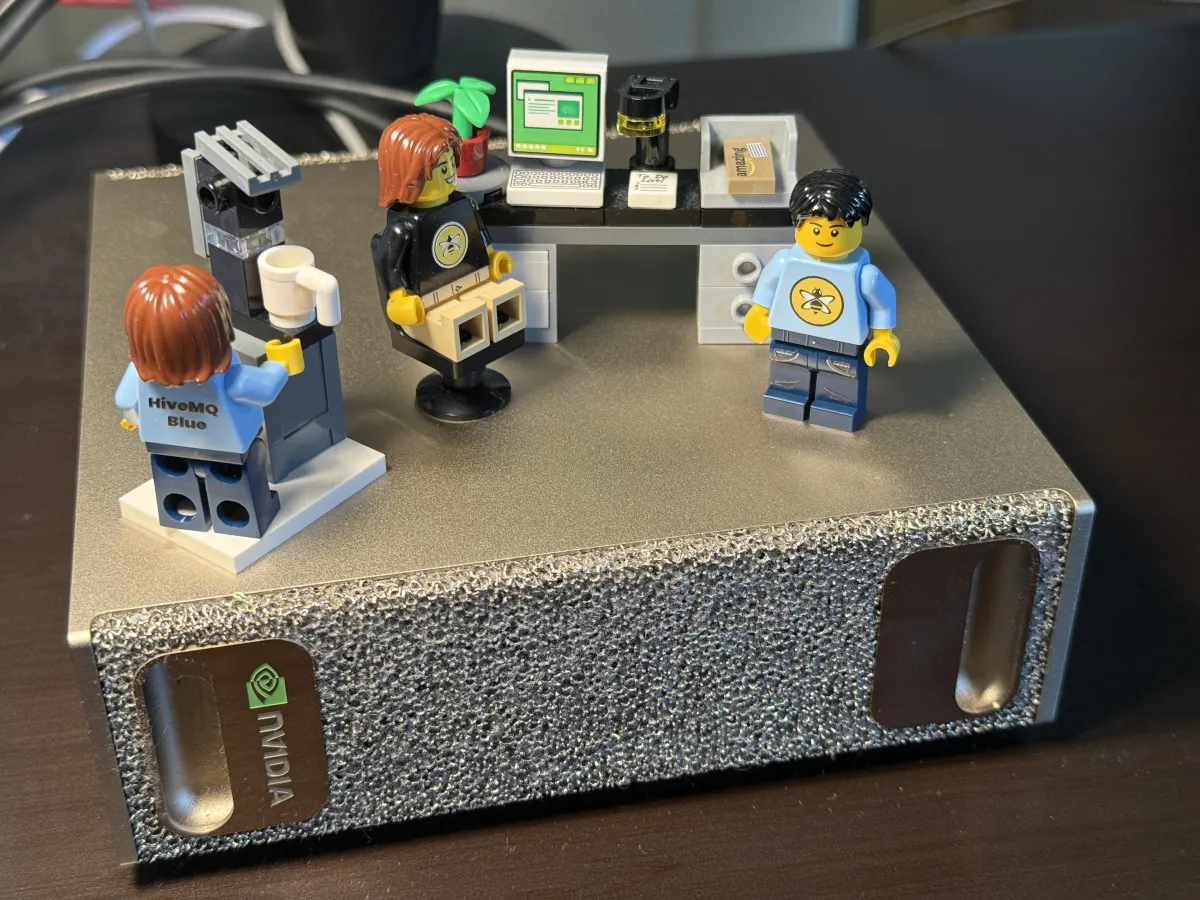
The spec that matters: 128GB of unified GPU memory on Blackwell. Enough to hold large models entirely in memory without paging or partitioning across devices.
The other thing that matters in practice is MXFP42 (Microscaling Floating Point 4-bit), a quantization format with native hardware support on Blackwell. I started with llama3.3:70b in FP8 quantization and the decode speed was unusable for agent work. MXFP4 brought it past the threshold where agent loops feel responsive rather than bottlenecked on inference.
These are the numbers I observed on my box (your mileage may vary depending on model, prompt length, and concurrent load):
| Model | Quantization | Parameters | Decode Speed |
|---|---|---|---|
llama3.3:70b | FP8 | 70B | ~4 tok/s |
gpt-oss:120b | MXFP4 | 120B | ~40 tok/s |
gpt-oss:20b | MXFP4 | 20B | ~55 tok/s |
Worth noting: the 120B model is significantly faster than the 70B. That's entirely down to quantization format. MXFP4 has dedicated hardware acceleration on Blackwell; FP8 does not3. On this hardware, quantization format matters more than parameter count.
Architecture: Two Agents, One Brain
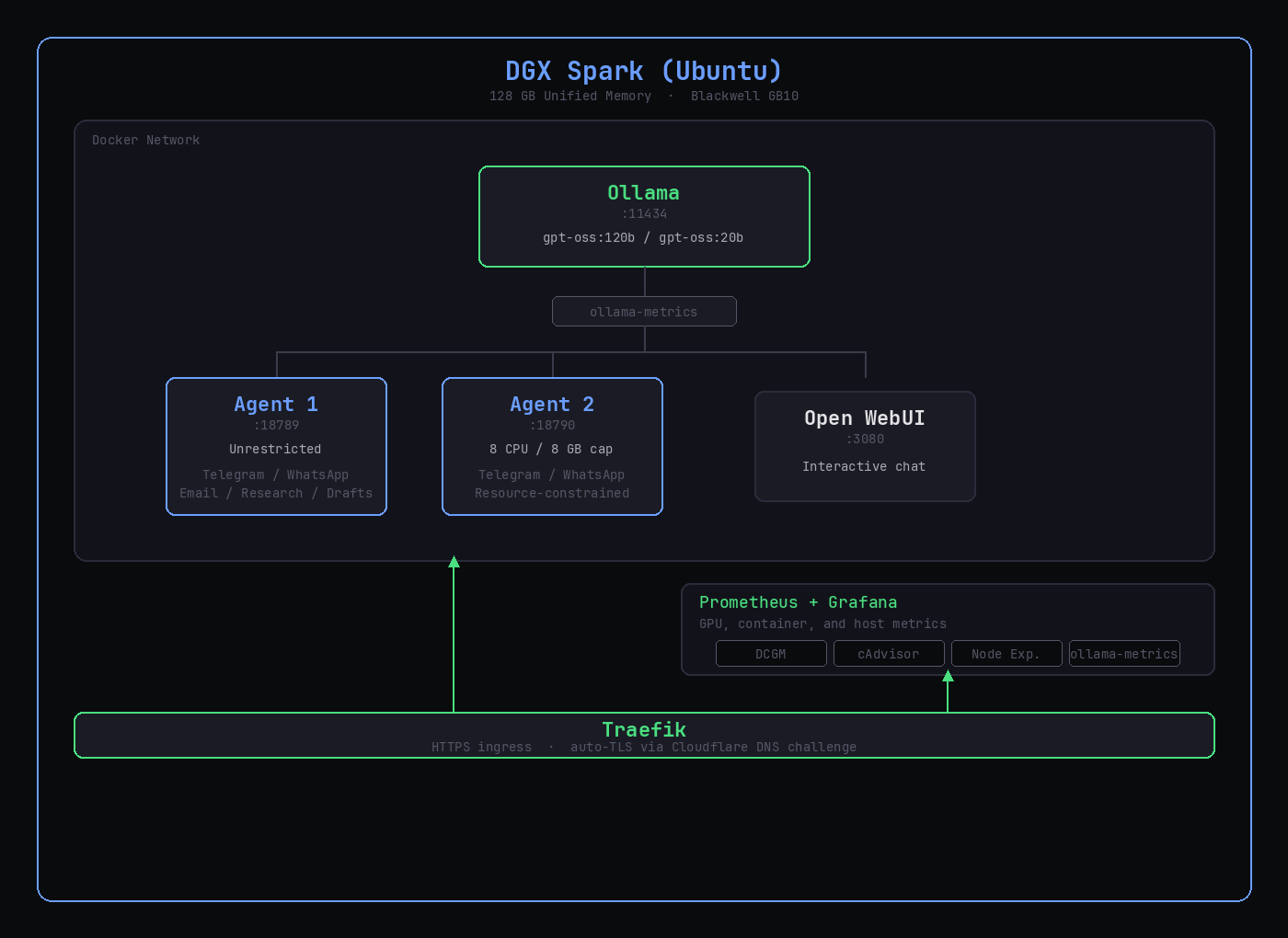
Two independent OpenClaw agent instances sharing a single Ollama inference server, with Open WebUI for interactive chat on the side.
Why Two Agents Instead of One?
OpenClaw agents are not stateless chatbots. Each instance maintains its own memory, messaging integrations (Telegram, WhatsApp), workspace, and permissions model. Running two instances means two independent assistants with no shared state4:
- Agent 1 (unrestricted resources): handles my tasks, including email triage, file organization, research, and drafting
- Agent 2 (capped at 8 CPU, 8GB RAM): handles a second user's tasks with resource limits that prevent it from starving the primary agent during heavy inference
Everything is isolated: config directories, workspaces, API keys, bot tokens. The only shared resource is the Ollama inference backend, which handles concurrent requests from both agents without issue5.
The Metrics Proxy
Between the agents and Ollama sits ollama-metrics, a transparent proxy that collects Prometheus metrics on every inference request: tokens per second, latency percentiles, model usage by caller. The agents don't know it's there. They just point OLLAMA_BASE_URL at the proxy instead of directly at Ollama.
Clean separation of concerns. Observability without touching Ollama or the agents.
The Model Strategy: Cloud + Local Hybrid
Not every task needs the same model quality (or the same cost structure). The agent framework supports routing to different backends based on the nature of the work:
| Task | Model | Why |
|---|---|---|
| Blog drafting, editing, strategy | Claude Opus (API) | Quality matters for writing |
| Email triage, categorization | gpt-oss:120b (local) | Good enough, zero marginal cost |
| File org, formatting, metadata | gpt-oss:20b (local) | Fast, simple tasks |
| Social post generation | Claude or gpt-oss:120b | Depends on quality bar |
The expensive API calls are reserved for where they make a measurable difference. Routine automation runs on local inference after the hardware cost is sunk. No per-token pricing, no rate limits, no data leaving the box.
Ollama Tuning for Multi-Agent Workloads
Ollama's defaults assume a single-user interactive session. Running it as a shared backend for multiple concurrent agents requires some tuning.
environment:
  - OLLAMA_NUM_PARALLEL=4        # Handle concurrent requests from both agents
  - OLLAMA_MAX_LOADED_MODELS=2   # Keep primary + fallback hot in memory
  - OLLAMA_FLASH_ATTENTION=1     # Enable flash attention optimization
  - OLLAMA_KEEP_ALIVE=24h        # Avoid model reload latency
  - OLLAMA_HOST=0.0.0.0:11434    # Listen on all interfaces (internal network)
The important one is OLLAMA_KEEP_ALIVE=24h6. Without this, Ollama unloads models after 5 minutes of inactivity. Reloading a 120B model takes 10-30 seconds, which is unacceptable when an agent is waiting on a response mid-task. Set it to 24 hours and the model stays resident in memory.
OLLAMA_NUM_PARALLEL=4 lets Ollama batch concurrent requests instead of queuing them. Both agents rarely submit at the exact same moment, but when they do, 128GB of unified memory gives enough headroom for parallel processing without memory pressure.
HTTPS with Traefik
The agents expose their UIs on direct ports (18789, 18790), but production access goes through Traefik with automatic TLS certificates via Cloudflare DNS challenge7.
labels:
  - "traefik.http.routers.openclaw-agent1.rule=Host(`agent1.example.com`)"
  - "traefik.http.routers.openclaw-agent1.entrypoints=websecure"
  - "traefik.http.routers.openclaw-agent1.tls.certresolver=cloudflare"
Each service gets its own subdomain with a valid Let's Encrypt certificate. No self-signed certs, no port forwarding, no manual renewal. Traefik watches Docker labels and configures routes automatically as containers start.
Monitoring
The monitoring stack runs alongside the core services:
- DCGM Exporter: GPU utilization, memory usage, temperature, power draw
- cAdvisor: per-container CPU, memory, network, disk I/O
- Node Exporter: host-level system metrics
- ollama-metrics: inference tokens/sec, latency, model usage
- Prometheus: metrics aggregation and storage
- Grafana: dashboards for all of the above
The Grafana dashboards are pre-provisioned8. They deploy with the stack, no manual configuration. On first boot you get GPU utilization over time, per-container resource consumption, inference throughput, and host health.
The one I check most is GPU memory usage. With two models loaded and two agents making concurrent requests, I wanted to know how close we'd get to the 128GB ceiling. In practice, gpt-oss:120b plus gpt-oss:20b together leaves comfortable headroom (I haven't seen it exceed 85GB).
Getting It Running
I tried to keep the setup as close to "clone and run" as possible9:
git clone https://github.com/magnusmccune/multiclaw-dgx-spark.git
cd multiclaw-dgx-spark

chmod +x setup.sh openclaw-agent1 openclaw-agent2
./setup.sh              # Creates directories, pulls models
cp .env.example .env    # Copy environment template
# Edit .env to add your Anthropic/OpenAI API keys (optional)
docker compose up -d

./openclaw-agent1 onboard   # Interactive onboarding
./openclaw-agent2 onboard   # Same for second agent
The setup script creates the directory structure, starts Ollama, and pulls both MXFP4 models. The model downloads are the slow part. gpt-oss:120b is roughly 40GB.
Wrapper Scripts
Rather than typing docker compose exec openclaw-agent1 node /app/openclaw.mjs ... every time, the repo includes wrapper scripts that handle the Docker exec and TTY allocation:
./openclaw-agent1 doctor              # Health check
./openclaw-agent1 status              # Instance status
./openclaw-agent1 dashboard --no-open # Get tokenized UI URL
./openclaw-agent1 agent --message "Summarize my unread emails"
A small thing, but it matters when you're interacting with the agents from a terminal multiple times a day.
Optional: Traefik and Monitoring
The base setup works with just Docker Compose. Traefik and the monitoring stack are in separate directories with their own compose files. Add them when you're ready:
# HTTPS ingress
cd traefik/
cp .env.example .env   # Add Cloudflare API token
docker compose up -d

# Monitoring
cd monitoring/
docker compose up -d
Lessons Learned
Quantization format matters more than parameter count on Blackwell. The mental model of "fewer parameters = faster" is correct in general, but wrong when one quantization format has hardware acceleration and the other doesn't. Check what your hardware actually accelerates before defaulting to the smallest model that fits in memory.
OLLAMA_KEEP_ALIVE is the difference between usable and not. The default 5-minute timeout means your first request after any idle period hits a 10-30 second model reload. For an interactive agent that might go quiet for 20 minutes between tasks, this makes the experience feel broken. Set it to 24h and forget about it.
Resource limits on the secondary agent matter more than you'd think. Without them, both agents can saturate CPU and memory at the same time. The 8 CPU / 8GB cap on Agent 2 is generous for normal operation but prevents it from competing with Agent 1 when things get heavy.
Token-based dashboard auth has a rate limiter. If you fat-finger the token URL a few times, the gateway locks you out with "too many failed authentication attempts." The fix is to restart the gateway container and grab a fresh token. Not obvious the first time it happens.
Separate API keys per agent. The .env supports separate Anthropic and OpenAI keys per instance with automatic fallback to shared keys. Convenient for getting started, but once both agents are active you'll want independent keys so you can actually see where the API budget is going.
NemoClaw and What's Next
Two weeks after I got this running, NVIDIA announced NemoClaw at GTC. It packages several things I wired together by hand, plus some I didn't have at all:
- OpenShell runtime: process-level sandboxing for agents. I'm currently relying on Docker isolation and OpenClaw's consent mode (
exec.ask: "on"), which works but is coarser-grained. OpenShell would be a meaningful upgrade for the security model. - Privacy router: policy-based routing between local and cloud models. Right now my model routing is manual (I pick local vs. cloud per task type in the config). A proper privacy router that makes that decision automatically based on data sensitivity is something I'd use immediately.
- Nemotron models: NVIDIA's own models optimized for this hardware. I haven't tested them yet against the gpt-oss models I'm running, but they're worth evaluating, especially if they're tuned for Blackwell.
NemoClaw is in early preview, so I'm not rushing to migrate. The plan is to adopt pieces incrementally: OpenShell first (the security gains are clear), then evaluate Nemotron as a model swap, then the privacy router once it stabilizes. The underlying architecture (shared Ollama, isolated agent instances, Traefik, monitoring) should carry over without major changes.
Further Reading
- multiclaw-dgx-spark on GitHub: the full repo with all compose files, scripts, and documentation
- OpenClaw: the agent framework
- Ollama: local LLM inference server
- Open WebUI: chat interface for Ollama
- NVIDIA DGX Spark: the hardware
Footnotes
-
OpenClaw agents can be connected to Telegram, WhatsApp, and other messaging platforms. They respond to messages asynchronously, meaning they're effectively always on. ↩
-
MXFP4 (Microscaling Floating Point 4-bit) is a quantization format co-developed by NVIDIA, ARM, Intel, and others as part of the Open Compute Project's Microscaling Specification. Unlike older 4-bit schemes, it uses per-block scaling factors that preserve model quality while enabling hardware-accelerated matrix multiplication on Blackwell GPUs. ↩
-
For comparison, running the same workload against Claude API at ~60 tok/s would cost roughly $15-75/day depending on usage. The DGX Spark pays for itself in inference savings within a few months if you have steady agent workloads. ↩
-
You could run them as two chat threads in a single instance, but you'd share memory, permissions, and messaging integrations. That defeats the purpose when the agents serve different users with different trust levels. ↩
-
Ollama's
OLLAMA_NUM_PARALLEL=4setting enables request batching. In practice, both agents rarely submit requests at the exact same time, but when they do, the latency impact is negligible with 128GB of unified memory. ↩ -
The default
OLLAMA_KEEP_ALIVEis 5 minutes. For a single-user interactive session that's fine; you'll reload the model once when you start chatting. For an always-on agent that processes messages throughout the day with unpredictable gaps, 5 minutes means constant reloading. ↩ -
DNS challenge means Traefik proves domain ownership by creating a TXT record via the Cloudflare API, so no ports 80/443 need to be exposed to the internet for certificate issuance. The certs are valid Let's Encrypt certificates that auto-renew every 60 days. ↩
-
The Grafana dashboards use community-maintained templates: Node Exporter Full (ID 1860), NVIDIA DCGM Exporter (ID 12239), and cAdvisor Docker Insights (ID 19908), plus an Ollama-specific dashboard from the ollama-metrics project. ↩
-
The setup assumes NVIDIA Container Toolkit is installed and working. On the DGX Spark this is pre-installed. On other NVIDIA GPU systems, run
sudo nvidia-ctk runtime configure --runtime=docker && sudo systemctl restart dockerfirst. ↩